
The IFRS 16 Accounting and Compliance Questionnaire is where you record your initial accounting judgments and assumptions relating to each of your leases. The information entered will be used to drive the calculations for your IFRS reporting. This article will walk you through where to find the Questionnaire, as well as provide a break down of each question.
Where to find the Questionnaire
Every onboarded Agreement has it's own unique questionnaire to be completed. If you don't answer the questionnaire for an Agreement, the Agreement will be excluded from your IFRS reporting.
Please note: You'll only be able to see the IFRS Questionnaire if you've turned on your Accounting & Finances Settings in your Organisation.
To find the Questionnaire, navigate to an Agreement, and click “Action”, then “Repair Data” on the Agreement Overview. This will take you to the Settings page of the Agreement Creation Process where you'll see the Accounting Compliance Questionnaire.
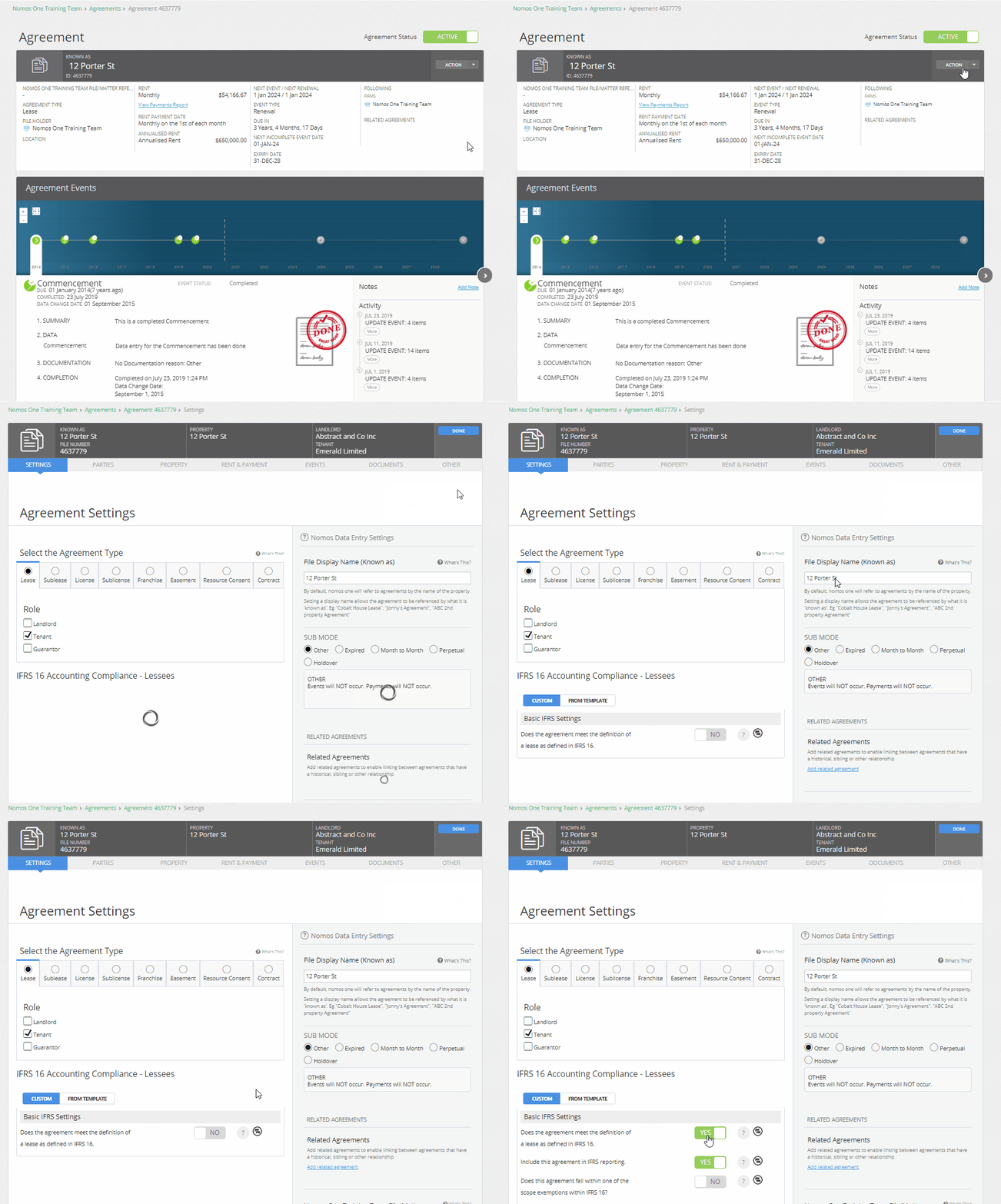
Break-down of the IFRS 16 Accounting Compliance Questionnaire
The IFRS 16 Questionnaire is a series of Yes/No questions and text fields. Beside each question there's a help button where you can find additional in-application guidance on each of the questions. You'll also see a comment box where you can capture any notes/justifications for the options you've selected or recorded.
Please note: Some of the questions currently in the questionnaire are no longer necessary to ensure correct reporting, and others are no longer supported. Please refer to the table below for more information.
Additionally, please note: You should not include any special characters in the numerical fields in the questionnaire, as this can cause errors in IFRS 16 reporting. For example, to record an interest rate of 3%, you would simply enter “3” in the interest rate field, rather than “3%”.
Basic IFRS Settings
| Does the agreement meet the definition of a lease as defined in IFRS 16? |
If your Agreement meets the definition of a lease as defined in IFRS 16, toggle the bar to read YES.
If your answer is NO, the agreement falls outside of the scope of IFRS 16 and won't be included in your reporting. |
| Include this agreement in IFRS reporting? |
By default, if the previous question is toggled YES, this question will also be toggled YES, and the Agreement will be included in IFRS 16 reporting.
If, for any reason, you don't want to include an Agreement in your reports, you can exclude it by toggling this bar to NO. |
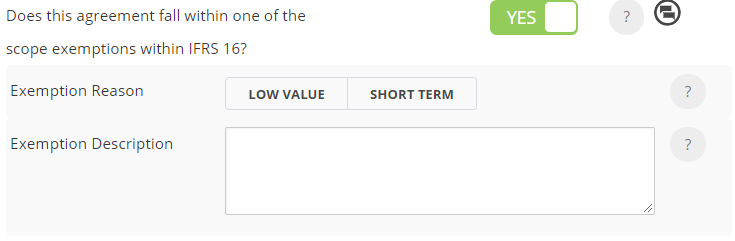
| Does this agreement fall within one of the scope exemptions within IFRS 16? |
Exempt Agreements are excluded from your overall portfolio balances but will still appear in your reports, displayed differently to indicate their exempt status. You must still complete the interest rate and number of renewals to factor in (as shown in the questions below) for this to apply correctly.
Once completed, and if your Agreement falls within one of the scope exemptions, toggle this question to YES and select either Low Value or Short Term as the Exemption Reason.
|
| Interest rate to apply to IFRS calculations. |
Record the discount rate that's used to determine the present value of future lease payments.
Please remember: The Modified box should be used for both Modified Retrospective and Simplified transition methods. |
| Number of renewals to factor into the IFRS 16 calculations. |
Select how many renewals you're reasonably certain to exercise under this agreement, as at the Commencement or Transition date of your agreement. The scale on the questionnaire is based on the number of renewals you've onboarded in your agreement.
Your IFRS reports will only generate up to the date that corresponds with the number of renewals you've selected. If you don't make a selection here, your IFRS reports by default will generate up until the expiry of the Initial Term for this Agreement. For example: In an agreement with three options to renew:
If you've already completed a renewal event on the agreement timeline, this will be greyed out and will not be able to be selected as it is historic. You must select one of the remaining available options. To check the total number of available renewals you have for an agreement, you can look at the Agreement Timeline or Events page.
|




Components of the Agreement
| Does the agreement contain a non-lease component that is required to be accounted for separately from the lease? |
If your agreement contains a non-lease component that is normally paid for as part of the rent payment, you can choose to account for this separately by toggling this question to YES, then record the amount to be accounted for separately. Please note: You cannot toggle the question “Does the amount that gets allocated increase in line with the CPI, Rent Review or Fixed Increase” to YES. If the amount is likely to change throughout the life of the Agreement, we recommend recording that amount in the Non IFRS Component section of the Rent & Payment page, rather than in the Initial IFRS Questionnaire. |
Transition Method
The transition method determines how an Agreement is treated for IFRS 16 reporting. Depending on your organisation's selected transition method and the commencement date of an Agreement, the options available may differ.
Select the transition method that you want to apply to your Agreement. By default, the selected method will be Org Defaults, and will apply to whichever transition method you have set as your default in your Organisation Accounting and Finance Settings.
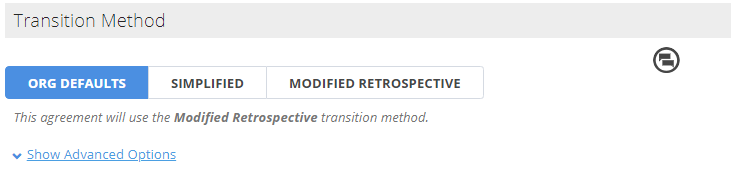
If your Organisation is configured to use the Full Retrospective transition method:
- You are unable to select an alternate option.
- The field will remain set to Org Defaults.
- This applies to all Agreements, regardless of the commencement date.
If your Organisation uses either the Modified Retrospective or Simplified transition method:
- You are able select either Simplified or Modified Retrospective, provided the Agreement commences on or before the transition date
If an Agreement commences after your Organisation's transition date, a transition method does not apply from an accounting perspective, however a selection is still required in the system. In this instance, please select Modified Retrospective. This will ensure that all relevant questionnaire fields are available, function correctly, and are accurately reflected in reports.
Advanced Options
Please note: Some questions state that they are only relevant to specific transition methods. For example, the question “Prepaid rent at the date of transition (Simplified Only)” is only relevant to agreements that have adopted the Simplified transition method. If data is entered in a question that does not correspond to your selected transition method, it will not be reflected in the reports.
If you have any issues related to this, please reach out to our Support Team at support@nomosone.com for assistance.
Initial Measurement of Lease Liability
| Did the lessee take control of the asset prior to the contractual commencement date? |
If you took control of the asset prior to your contractual commencement date, toggle the bar to YES and record the date that you took control of the asset. The date you enter will serve as your commencement date in IFRS 16 Reports, with Lease Liability and Right of Use Asset balances unwinding from that date onwards. The First Payment Date recorded on the Rent & Payment page will remain in place, meaning that rent payments will only begin from that date forward. |
| Include amount expected to be payable under residual value guarantees? |
If you expect to pay a residual value guarantee, toggle the bar to YES and record the amount of that guarantee. This will be added to the Lease Liability at the present value of the payment.
|
| Include exercise price of a purchase option that is reasonably certain to be exercised? |
If you reasonably expect to exercise a price of purchase option, toggle the bar to YES and record the amount of the purchase option. This value will be added to the Lease Liability at the present value of the payment.
If known, use the calendar tool to enter in the end date of the useful life of asset if it does not align with the end of the lease term. If you're adding in a date here, you'll need to ensure you've also recorded an amount above or you'll get an error message when you try to run your reports for this agreement.
|
| Include payments of penalties for terminating the lease? |
If you expect to terminate an agreement early, toggle the Include payments of penalties for terminating a lease bar to YES. Record the Expected Termination Date, and if applicable, record the amount of the penalty fee. The penalty fee will be added to your Lease Liability.
If you enter in an amount, you must also record an expected termination date or you'll get an error message when you try to run your reports. |


Initial Measurement of Right of Use Asset
| Initial direct costs incurred to secure the lease |
If there were any initial direct costs incurred to secure the lease, toggle YES and record the amount of the costs.
Initial direct costs are the incremental costs of obtaining a lease that would otherwise not have been incurred. These costs may include commissions, legal fees and costs of negotiating lease terms and conditions (if contingent on origination of the lease), and any costs of arranging collateral.
|
| Make Good Value (Full Retrospective and Modified Retrospective only) |
If your transition method is Full Retrospective or Modified Retrospective and there is a provision to recognize the costs to dismantle and remove an underlying asset under IAS 37, toggle the Make Good Value to YES and record the amount.
If you're using the Simplified transition method and you have a make good value, you'll need to record this under the make good question designed for simplified transition methods. If you enter data in a field that does not match your transition method, the system will not take it into account. |


Accounting Elections
Other Standards
| Is the lease considered an investment property and the subsequent measurement under the fair value election as set out in IAS 40 Investment Property? |
If the Right of Use Asset is accounted for under IAS 40 toggle the bar to YES. If so, at each applicable reporting date you will have to adhere to the valuation requirements per IAS 40 and the straight line depreciation methodology will not apply. Any increase or decreases in value of the Right of Use Asset will wash through the Profit and Loss.
You'll also need to enter in the fair value of the Right of Use Asset at the date of transition under the Modified Transition > Other Considerations section of the questionnaire. |
| Does the lease relate to a class of property that the lessee applies the revaluation model in IAS 16 Property, Plant and Equipment and do you want to apply that model to this lease? |
This functionality has not been re-platformed into the new engine. As such, you cannot make any selections here.
|
| Is the lease required to be fair valued on commencement (e.g. peppercorn lease)? |
If your lease is required to be fair valued on commencement, toggle YES and record the fair value at the date of commencement.
|


Business Combinations
| Was this agreement acquired as part of a business combination? (Full Retrospective and Modified Retrospective only) |
If your lease was acquired as part of a business combination, toggle the question to YES. Record the Effective date of transaction, discount rate of transaction, and any deferred gain/loss recognized on that date. Please note that your reporting for this agreement will only start on the effective date of this transaction.
|

Intercompany Leases
| Is this lease an intercompany lease? |
If desired, you can set up internal management of inter company leases by recording an Intercompany Lessor reference and an Intercompany Percentage. This will have no impact on the calculation of your Lease Liability or Right of Use Asset.
|

Assignments
| Was this agreement assigned to the company? |
If an agreement has been assigned to your organisation i.e. the agreement has been assigned from the original lessee to your organisation (as the new lessee) and your organisation has assumed all obligations and lease payments, then toggle the bar to YES.
Record the Assignment Date and the Discount rate on the date of assignment. Your reporting will only start on the Assignment date.
Although you may have entered Assignment Events during the initial onboarding process, they will not automatically pull through to your IFRS assumptions, hence you will still need to make a selection here if there is an assignment. |

Subleased Elements
| Is the agreement subsequently subleased? |
This functionality has not been re-platformed into the new engine. As such, you cannot make any selections here.
|
Modified Transition
If you have elected to use either of the Modified transition approaches, you will need to read through and answer the following questions (where applicable).
Adjustments to ROU Asset
| Did the lease originate under a sales and leaseback arrangement under IAS 17? |
This functionality has not been re-platformed into the new engine. As such, you cannot make any selections here.
|
| Was this lease acquired as part of a business combination and a lease asset or liability created on acquisition? (Simplified only) |
If you're using the Simplified transition method, and this lease was acquired through a business combination, with a lease asset or liability recognised on the date of transition, toggle the bar to YES.
Record the amount of deferred gain or loss on the balance sheet at date of transition.
|
| Is there an onerous lease provision associated with this lease? | If there is an onerous lease provision associated with a lease, toggle the bar to YES. Record the amount of the onerous lease provision on the date of transition.
|
| Is there a future make good provision which requires an adjustment to the ROU asset at transition date? (Simplified only) |
If you're using the Simplified transition method, and there is a make good provision, toggle YES and enter the relevant amount in the space provided.
The effect of this is that at transition, the make good provision is to be removed from its current classification on the balance sheet and reclassified to the Right of Use Asset, thus increasing its value. Liability does not change and is still accounted for under IAS 37.
|
| Prepaid rent at the date of transition (Simplified Only) |
If you have any prepaid rent at transition, enter this on the Rent and Payment page of the Agreement Creation Process using the Prepaid Rent function. You are no longer required to enter pre-paid rent here in this question.
|
| Any deferred/accrued rent payable at the date of transition? (Simplified Only) |
If you are using the Simplified transition method, and there was any deferred or accrued rent payable at the date of transition, toggle YES and record the amount.
The effect of this is that at transition, the rent amount recorded will appear as “Accrued Rent - Suspense account” in the Journal report, and the amount will be added to the opening Lease Liability balance. There will be no impact to the Right of Use Asset. |


Other Considerations
| Was the lease previously classified as investment property (all approaches)? |
This functionality has not been re-platformed into the new engine. As such, you cannot make any selections here.
If your agreement was previously classified as an investment property you can use the "Is the lease considered an investment property and the subsequent measurement under the fair value election as set out in IAS 40 Investment Property?" question.
|
| Was the lease previously classified as PP&E on transition? |
This functionality has not been re-platformed into the new engine. As such, you cannot make any selections here.
|
| Is the lease required to be fair valued on transition (e.g. peppercorn lease)? |
This functionality has not been re-platformed into the new engine. As such, you cannot make any selections here.
|
Once you've completed the IFRS 16 Questionnaire, you'll see the agreement you've completed it for show in your IFRS Reporting. If you need to record a change to your assumptions at a later date, you can pin point these changes using the IFRS Settings Change Questionnaire.
Nomos One does not provide or purport to provide any accounting, financial, tax, legal or any professional advice, nor does Nomos One purport to offer a financial product or service. Nomos One is not responsible or liable for any claim, loss, damage, costs or expenses resulting from your use of or reliance on these resource materials. It is your responsibility to obtain accounting, financial, legal and taxation advice to ensure your use of the Nomos One system meets your individual requirements.